Loops
Loops let you repeat actions a certain number of times, or until a condition is met (or not). They are very useful for automating repetitive tasks.
Repeat X times
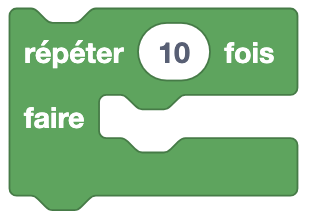
Type: Order
Definition :
This loop repeats the blocks it contains a certain number of times. To define the number of repetitions, you can directly write the desired number of times in the box or use a block containing a value.
Use :
If we want Eliobot to advance one space 5 times.
Repeat while
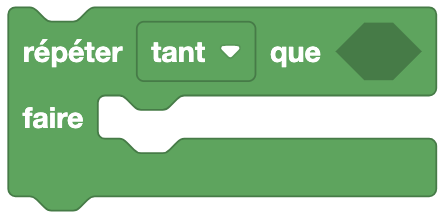
Type: Order
Definition :
This loop is made up of two parts:
- Condition: while/until this condition is/is true.
- Condition to check: the condition to check at each loop turn.
As long as
This loop repeats the blocks it contains as long as the condition is true.
Until
This loop repeats the blocks it contains until the condition is true.
Use :
If we want Eliobot to move forward as long as a sensor does not detect an obstacle.
Count with i
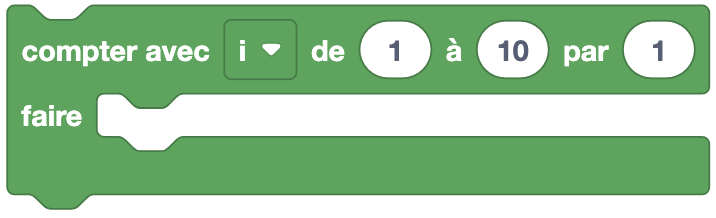
Type: Order
Definition :
This loop allows the blocks it contains to be repeated a certain number of times using a variable i which goes from 0 to the defined value. This variable i is incremented each loop by the last value.
Detail
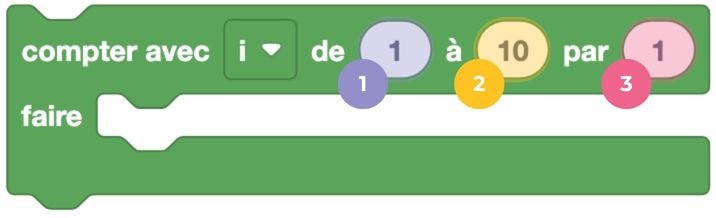
- Start value of iterations.
- End value of iterations.
- Increment of the variable
iat each loop turn.
Use :
If we want Eliobot to move forward 5 times by one square, displaying the square number.
For i in the list
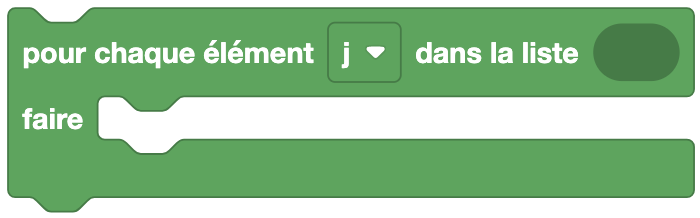
Type: Order
Definition :
This loop allows you to repeat the blocks it contains the number of times there are elements in a list.
Use :
If we want to browse a list of values and display them one by one.
Exit loop or Move to next loop iteration
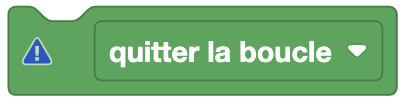
Type: Order
Definition :
This block has two uses:
- Exit loop: allows you to exit the current loop.
- Skip to next iteration: allows you to move to the next iteration of the current loop.
Use :
If we want to exit an infinite loop under certain conditions, or skip an iteration in a Repeat X times loop.