Colors
Eliobot is equipped with a multi-color LED, allowing it to display more than 16 million colors.
Select a color to display
The simplest method to turn on the LED is to use the Show color block, which offers the default red color.

Type: Order
Definition :
It can then be changed by clicking on the colored bubble, revealing a table with several colors. All you have to do is click on the one you want to display.
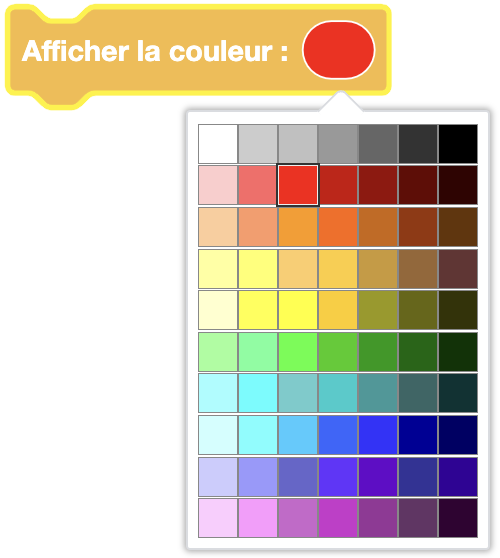
Please note, black corresponds to an off LED.
Use :
If you want to light up the LED with a specific color. For example, to indicate the status of a sensor.
Turn off the light

Type: Order
Definition :
Two possibilities for turning off the LED:
- The first is to display the black color with the block above, which amounts to setting all colors to 0
- The simplest way is to use the dedicated block below:
Turn off light
Use :
If you want to turn off the LED. For example, to indicate the end of an action.
Example
Learn how to use the LED in the following example:
Flash the LED - Elioblocs